Image

To initially install HOBOware, you must be an administrator. (You do not need to be an administrator to run HOBOware once it is installed).
If you experience issues with connection, freezing or trouble accessing HOBOware preferences You may have to reinstall the software to correct. Most likely the OS is not allowing the HOBOware software access to the USB port.
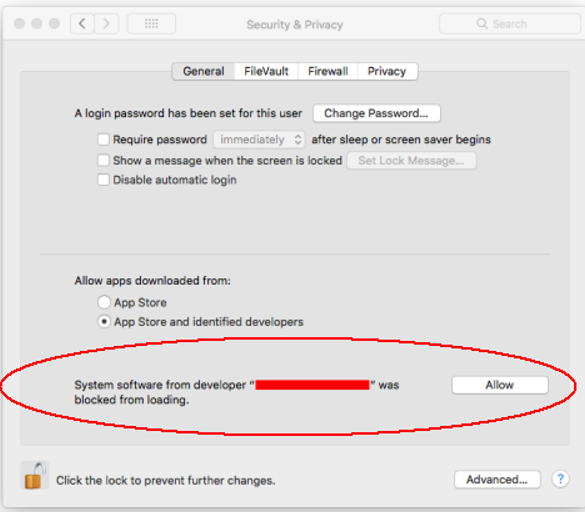
Under "General", you should see the prompt below. You will need to allow this to be able to use the USB peripherals.
When you open HOBOware Pro, you will be prompted to enter your license key from the email confirmation or online receipt. Type the license key in the License Key Manager and click OK. You will need to reopen HOBOware after entering the license key (you will not be required to enter the license key when upgrading to subsequent versions of HOBOware).
Periodically there will be updates to the HOBOware application that will need to be installed.
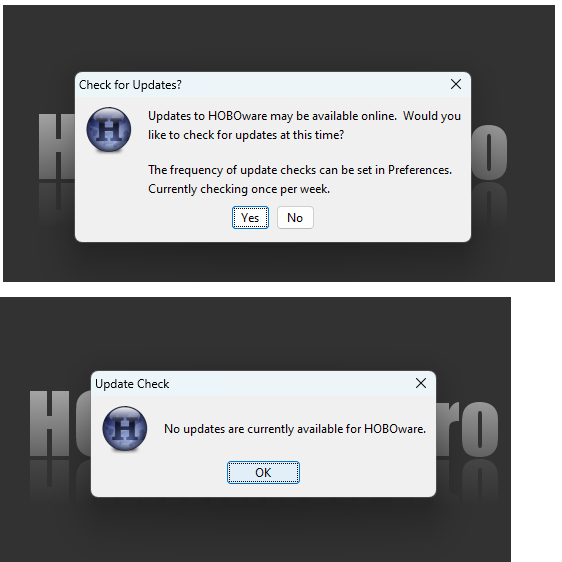
When you open HOBOware you may see a prompt to check for updates. If your network allows these types of updates, you can select yes on this prompt and if an update is available, it will install and if not, you will be notified that you are currently up to date:
You can also download the update directly from our website and install as described earlier: https://www.onsetcomp.com/support/help-center/software/hoboware